Stop Wrestling with Image Edits. Your CMS Just Got Smarter
How ACOLONO is empowering editors to create, edit and combine images directly in the CMS by using AI assisted workflows.

You know that moment when you've uploaded the perfect image, only to realize it needs just a tiny tweak? Maybe the background's too busy. Or you need to combine two images into one cohesive visual. And suddenly you're stuck.
You could fire up Photoshop (if you even have it). You could email your designer (and wait). Or you could just... give up and use the image as is.
We've been there. And honestly? It shouldn't be this hard.
The Image Editing Bottleneck Nobody Talks About
Here's the thing about content management: you're probably great at creating content. You understand your audience, you know what story needs telling, and you can spot a good image when you see one. But the second you need to manipulate that image, you hit a wall.
It's not that you can't learn Photoshop. It's that you shouldn't have to. Your job is creating compelling content, not becoming a graphic designer.
That bottleneck costs time. It costs money (ever calculated how many designer hours you're burning on simple tweaks?). And worst of all, it kills momentum. When you're in the creative flow and you have to stop, file a ticket, and wait... that flow's gone.
What If Your CMS Could Actually Edit Images?
This is where things get interesting. At ACOLONO, we've integrated NANO banana directly into Drupal. And no, this isn't just another image cropping tool.
NANO banana uses AI to edit and manipulate images right inside your content management system. You're already there managing your content anyway. Now you can edit your images without leaving.
Let me show you what this actually looks like in practice.
Combining Images Without the Headache
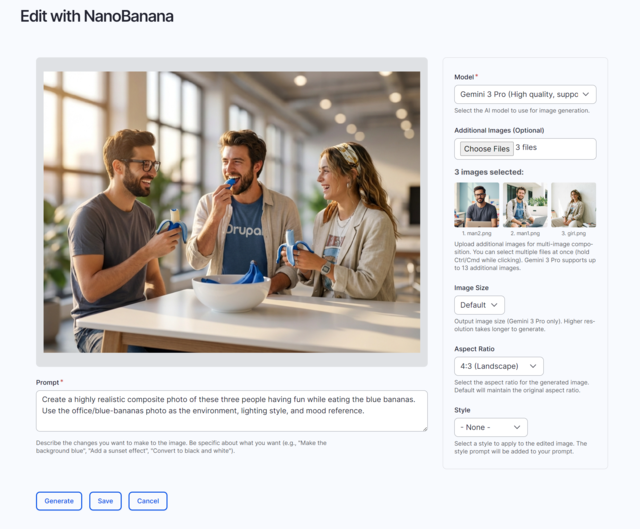
Need to merge multiple images into one composition? This is usually where things get complicated. You'd open multiple files in different programs, try to match the lighting, fiddle with layers, export, re-upload...
With NANO banana, you just select your images (up to 14 of them, depending on which AI model you use) and describe what you want. "Combine these images into a single scene with the character from image 1 in the environment from image 2, maintaining consistent lighting."
The AI handles the composition. You get a preview. If it's right, you save it. Done.
This isn't theoretical. We're talking about real composites, style transfers, character combinations. The kind of work that used to require either serious technical chops or a designer on retainer.
Small Tweaks After Upload (Finally)
You've uploaded an image. It's almost perfect. But the sky should be more dramatic. Or that background element is distracting. Or you want it to look like a watercolor painting instead of a photo.
These small post-upload manipulations are exactly where the old workflow falls apart. The image is already in your media library. You don't want to download it, edit it elsewhere, and re-upload. You just want to make the change and move on.
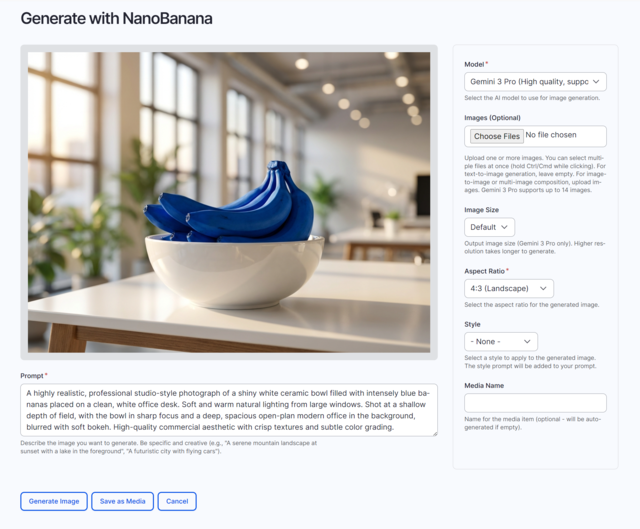
NANO banana lets you do exactly that. Click "Edit with NanoBanana" on any media item, describe your change in plain language, and generate a new version. Want to "remove the background and make it transparent"? Just say it. Need to "add dramatic lighting from the left"? Done.
The prompt is in natural language. You're not learning keyboard shortcuts or navigating menu hierarchies. You're just describing what you want, the way you'd explain it to a designer.
Two Speed Options for Different Needs
You get to choose between two AI models, and this choice actually matters:
Gemini 2.5 Flash is your quick iteration tool. It's fast, it's responsive, and it's perfect when you're trying different approaches or need something right now. Think of it as your sketching tool. You can work with up to 3 images at once.
Gemini 3 Pro is what you reach for when you need the final version to be absolutely right. It's slower, but it handles up to 14 images and can generate output up to 4K resolution. This is your production-quality option.
Having both means you can iterate quickly with Flash, then generate your final asset with Pro. That's actually how professionals work. Now you can too.
Why This Matters (Beyond Just Convenience)
Yeah, saving time is great. But there's something deeper happening here.
When you can manipulate images yourself, you make different creative decisions. You try things you wouldn't have tried if each attempt meant filing another ticket. You iterate more. Your content gets better because you're not constrained by the friction of getting help.
And you learn faster. Every time you describe what you want and see the result, you're building your visual vocabulary. You start understanding what works. You get better at articulating your vision.
That's empowering. Not in a buzzword way, but in a "you can actually do your job better" way.
Responsible AI Integration (Because This Stuff Matters)
Look, we could have just plugged in an AI tool and called it innovation. But that's not how we work at ACOLONO.
Every AI implementation raises questions. Who owns the generated content? What about copyright in training data? How do we ensure quality and appropriateness? These aren't afterthoughts; they're fundamental design questions.
With NANO banana, we've built in controls that matter:
System instructions let you set global standards for all image generation. You can require "high-quality, professional images suitable for editorial use" or "maintain photorealistic style unless otherwise specified." This isn't just about quality control. It's about ensuring your AI-generated content aligns with your brand and values.
Style presets give you consistency. Create reusable style prompts (watercolor, photorealistic, minimalist, whatever you need) that your whole team can use. This means your visual identity stays coherent even as multiple people generate images.
Preview before saving seems obvious, but it's critical. You're never locked into an AI-generated result. You always see it first, you always have the chance to iterate or discard.
The transparency matters too. When you use NANO banana, you know you're using AI. There's no hiding that fact. And you should know it, because it affects how you use the tool and how you think about the results.
What This Looks Like in Your Workflow
Imagine you're creating a blog post about sustainable urban planning. You've got three good images: a city skyline, a park, and some people cycling. But what you really need is one cohesive image that shows all three elements working together.
Old way: Brief your designer, wait for a mockup, give feedback, wait for revisions, finally get the image, upload it.
New way: Upload your three images, click "Generate with NanoBanana," write "Combine these into a scene showing a sustainable city with the skyline in the background, the park in the middle, and the cyclists in the foreground," generate, review, save.
Time saved? Hours or days, depending on your designer's schedule. But more importantly, you stayed in flow. You finished your blog post in one sitting instead of having to come back to it later.
The Bigger Picture
This is part of something larger we're working on at ACOLONO. We're not just building tools; we're rethinking what content management can be.
Why should managing digital content require a team of specialists? Why should you need a developer to update a form, a designer to tweak an image, a technical writer to maintain documentation? You shouldn't. At least not for the everyday tasks.
AI, used responsibly, can flatten those dependencies. It can make powerful capabilities accessible to the people who actually create content. That's what excites us about this work.
NANO banana is one piece of that puzzle. It handles images. But the principle applies everywhere: take complex technical tasks and make them accessible through natural language and intuitive interfaces.
Getting Started
If you're running Drupal (version 10.3 or later), you can start using NANO banana today. The module integrates directly with your existing media management workflow. You'll need a Google Gemini API key, which you configure once in the AI provider settings.
After that? It just works. "Edit with NanoBanana" and "Generate with NanoBanana" buttons appear right where you'd expect them, in your media forms and edit screens.
The learning curve is minimal because you're already familiar with managing media in Drupal. We've just added new capabilities to your existing workflow.
Where This Goes Next
We're actively developing NANO banana based on real-world usage. What features matter most? What prompts work best? What use cases are we missing?
If you try it, let us know what you think. The module is in beta, which means we're still refining it based on feedback. Your actual workflows, your actual challenges, your actual successes. That's what makes this better.
And if you're not on Drupal? We're watching the broader CMS ecosystem. Responsible AI integration in content management is still early days. There's a lot of room for innovation, and we're here for it.
Want to see NANO banana in action? Check out the Drupal module page for installation instructions and examples. Or if you're curious about how we're thinking about AI integration more broadly, reach out. We're always happy to talk about this stuff.
Because here's the truth: AI tools are coming to every CMS eventually. The question isn't if, but how. We're committed to doing it thoughtfully, responsibly, and in ways that actually make your work better.
That's the ACOLONO approach. And we think you're going to like where this is heading.